Brand guidelines
Logo
The CoVet logo pairs a logomark (the “icon”) with the wordmark “co·vet” set in lowercase with a mid-dot separator. Use the full-color primary logo whenever possible.
Approved configurations

Horizontal lockup
Logomark to the left of the wordmark. Default for most applications.
Vertical lockup
Logomark stacked above the wordmark. Use when horizontal space is limited, such as square social avatars or event signage.

On dark backgrounds
The horizontal lockup with white wordmark, for use on dark brand backgrounds.
The logomark (icon) may be used alone for favicons, app icons, small-scale UI, and contexts where the brand is already established.
Writing the name
When the logo cannot be reproduced as an image (plain-text emails, legal documents, internal chat), write the brand name as CoVet with a capital C and capital V.
Do not use “Covet,” “COVET,” “Co-Vet,” or “co·vet” in running text.
Clear space
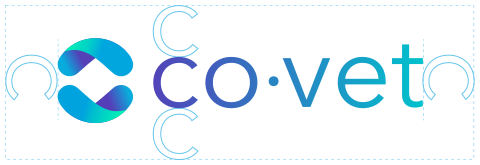
Maintain a clear margin equal to the height of the “C” in the wordmark on all sides. No text, imagery, or graphic elements may enter this space. Keep a clean background behind the logo. No patterns or textures.
Minimum size
40px height — digital minimum
Minimum size: 40px height digital, 0.75 in (19 mm) print. Below these sizes the wordmark becomes difficult to read. Switch to the logomark only.
Partner lockups
When the logo appears alongside a partner, event, or co-branded element, maintain clear space between the CoVet logo and any adjacent mark. Use a vertical divider line (1px, Gray Border #CACCCC) when logos sit side by side.
PARTNER LOGOExample co-branded lockup: the CoVet logo, a 1px vertical divider (Gray Border #CACCCC), then the partner mark, with equal clear space on both sides.
Incorrect usage
Do
- Use the full-color primary logo whenever possible.
- Keep a clean background behind the logo for legibility. No patterns or textures.
- Maintain clear space equal to the height of the “C” in the wordmark on all sides.
- Switch to the logomark only below the minimum sizes.

Do not
- Stretch, rotate, or distort the logo.
- Add drop shadows, outlines, glows, or other effects.
- Change colors outside the approved palette.
- Place the logo on busy or low-contrast backgrounds.
- Rearrange the logomark and wordmark relationship.
- Recreate the logo using a different typeface.
