)
)
CoVet is an AI clinical copilot built for veterinary teams. You can check the original transcript, review the AI-generated notes, make changes, and approve the final record yourself. Statements from documents link to their page and passage. For what was said, play back the moment in the timestamped transcript. Fix any statement you can't find a source for.
Key takeaways
|
When you record a consultation, CoVet turns the conversation into a structured clinical record, organising the relevant history, examination findings, assessment, and treatment plan into your preferred format. That's the AI scribe at work, and what it hands you is a draft for your review.
Picture the morning. A referral packet landed at 8:40. Before lunch you saw Bonnie and Betsy together: two dogs, one owner, a lot of back and forth about who ate what. Now two drafts sit in the case, and you're asking the question every vet asks before signing. Did I actually say that?
Here's how to answer it, line by line, against what was said and what was sent, in a few minutes. Then you approve the record and it goes back to the patient file in your existing practice management system.
Why check against the source instead of rereading the draft?
A reread catches typos and clumsy phrasing. It won't catch a dose you never said, or a finding from last year's referral written up as today's exam. An AI draft reads fluently whether a line is right or wrong, which is why AI scribe hallucinations are hard to spot by eye.
The research on veterinary scribes is thin. As of March 2026, no peer-reviewed study had measured the accuracy of any veterinary AI scribe, CoVet included (Brundage, Frontiers in Veterinary Science, March 2026 [LINK NEEDED: Brundage URL from brief 03's sources]). Human medicine offers one warning worth knowing: a 2026 preprint found that automated checkers spot added content well and missed content barely better than chance. More on that in step 5.
So the check that counts is the one against the source: the PDF a finding came from, or the moment in the consult when something was said. For the full list of what to look for, section by section, see what to verify in an AI-generated SOAP note [LINK LIVE WHEN BRIEF 03 PUBLISHES]. For the bigger picture, here's how CoVet approaches AI quality.
What can you trace in a CoVet draft, and how?
A CoVet draft has two kinds of source, and you check each one differently. Here's where the AI scribe's sources live and what each check tells you, as of October 2026, per CoVet's help center (AI Citations, transcripts, AI Chat).
What's in the draft | Where it came from | How you check it in CoVet | What the check can't tell you |
|---|---|---|---|
A finding from a history, referral or lab PDF | A PDF added to the case | Click the inline citation. The PDF opens at the cited page and passage. | Whether the PDF was right, or what the summary left out |
Something said in the consult | The recording | Open the recording, search the transcript, click the line to play that moment | Spoken content has no inline citation, so you find the line yourself |
An AI Chat answer about the case | PDFs, transcripts and case notes | Open View Sources: a PDF shows page and passage, a recording shows the transcript line | What the chat didn't bring up |
A statement you can't find anywhere | Nothing you can open | This is the one to fix or delete | Nothing to check against |
Something said that isn't in the draft | The recording | Search the transcript for what you expect to see | Citations and AI Chat won't flag it |
The row that matters most is the last but one. When nothing in the case supports a statement, that's your signal. Most of how to check AI scribe notes comes down to that one habit: look for the source, and treat a missing source as a problem to fix.
How do you check an AI scribe note in CoVet?
Seven steps, in the order that saves you the most time. As of October 2026, per CoVet's help center.
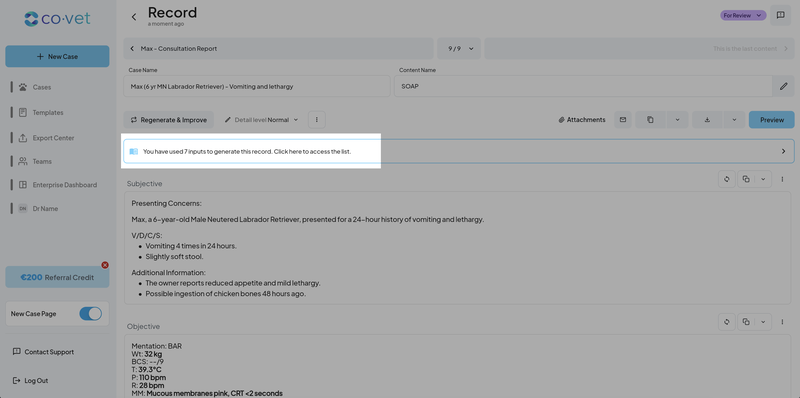
1. Check the inputs in the sources panel
Before you read a single line, check what went into the draft. Click the source banner at the top of the record. The sources panel opens on the right on desktop, or as a bottom sheet on mobile, and lists every input CoVet used.
Make sure they're this patient's: the right recordings, the right PDFs. A draft built from the wrong input cites its sources perfectly and is still the wrong record.
Working a shared case? You can set CoVet to generate from only your own recordings by default, then change the selection when a colleague's audio belongs in the record (Product Updates, September 2026).
2. Read the high-risk lines first
Some errors cost more than others. Read these first:
drug, dose, route and units
weight and its unit
allergies
species, sex and neuter status
laterality
the right pet, when you saw two
anything planned that's written as done
[MEDICAL REVIEW: Dr. Mike Parent to confirm this list and its order.]
Mark the lines you'll check against the source in steps 3 and 4. Everything else gets a normal read-through. If you want a fuller way to review AI-generated SOAP notes, work through the section-by-section checklist [LINK LIVE WHEN BRIEF 03 PUBLISHES].
3. For anything from a document, open the citation
Look for the inline citation links in the text. They appear when the record cites a PDF. A record generated without PDF inputs has none, so don't go hunting for them on a straight consult.
Click a citation and the PDF opens at the cited page, with the passage highlighted. Read the sentences around it too. A finding from a 2023 referral belongs in the history, and the context on the page tells you which is which.
In the sources panel, expand a PDF row to see its "Relevant citations": the citation number, the page and the quote. Each one opens the PDF at that spot (Understanding AI Citations and Sources).
The same goes for summaries of histories and referral packets: each fact cites its page and passage.
4. For anything that was said, go to the moment
From the case, open the recording. The full transcript appears, searchable, with playback.
Each line shows when it was said. The recording date sits once at the top, and each line shows a time range in your local time, or a single timestamp for a single moment. Timestamps follow your 12-hour or 24-hour setting (transcripts FAQ).
Search the transcript for the drug, the dose or the limb. Click the sentence and CoVet plays that exact moment in the audio (Product Updates, August 2025). Hearing it settles who said it: the owner or you, Bonnie or Betsy.
If a line's timestamp can't be determined, you'll see "Time unavailable" with a warning icon. For that stretch, play the audio around it.
If the word is in the transcript but wrong in the draft, it was misheard or mis-drafted. If it isn't in the transcript at all, nothing supports it. Either way, you fix it in step 6.
5. Look for what's missing
A citation shows where something in the draft came from. It can't show you what never made it in.
Software is weak here too. A preprint tested eight automated judge designs on human-medicine notes. They scored 0.79 to 0.94 at spotting added or altered content, and 0.50 to 0.63 at spotting omissions, close to chance (Fox et al., arXiv 2608.31016, August 2026, preprint). So this part is yours.
A quick method: before you read the draft, jot the three things you expect to see in it. Then look for each one. Start with declined care and allergies.
To find where each was discussed, search the transcript. AI Chat helps you locate the moment, too. Ask "where did we discuss the carprofen dose?" and open View Sources. For a recording, it names the recording and the transcript line. Read or play that line, then compare it with the draft yourself. As CoVet's help center puts it, AI Chat is "not a replacement for your clinical judgment" (Using CoVet's AI Chat).
6. Correct the draft and keep the original transcript
Fix the record by hand. Do it before you sign, while the consult is fresh, then approve the final record yourself.
The transcript has two views: Transcript Mode, with clickable timestamps, and Edit Mode, a block-text working copy you can change. Edits in Edit Mode don't change the text in Transcript Mode, so the original stays intact as your reference (Product Updates, September 2025).
Got a drug name that comes out wrong every time? Add it to your dictionary under My Account > Personalization > Misspellings, or from the case through the three-dot menu: "Add misspellings to the dictionary". Set the language and a category, like drug names. The rule applies to records you generate from then on (Correcting Repeated Spelling Errors in Records). It won't change the draft in front of you, so fix that one by hand.
7. Keep the trail when your clinic needs one
You can download a recording's transcript as a formatted PDF, with a timestamp on every line. Timestamps carry over when you copy and paste the text, too (Product Updates, August 2026).
For sensitive consultations, an August 2026 setting limits playback to the person who created the recording. Here's how CoVet handles access and data.
Example: two pets, one dose in the wrong record
This is an illustrative example. It describes no real clinic or client.
Bonnie and Betsy come in together. Bonnie has had vomiting and diarrhea. Betsy has no GI signs. The owner talks about both at once, the way owners do, and CoVet drafts a separate record for each pet.
The vet catches it in step 2. Reading Betsy's plan first, she finds an antiemetic she never prescribed for Betsy.
[MEDICAL REVIEW: Dr. Mike Parent to name the drug and confirm the scene reads true. No dose figures unless Medical supplies them.]
In step 4 she searches the transcript for the drug, finds the line with its timestamp and clicks it. There's her own voice, saying it's for Bonnie.
In step 6 she moves the line to Bonnie's record by hand. The transcript stays exactly as it was recorded.
Next time, one habit from CoVet's help center makes this rarer: use each pet's name when you switch between them during the consult (Tips for High-Quality CoVet Records). "Bonnie's had the vomiting. Betsy's been fine."
Can citations help before the consult, too?
Yes. The same citations work on a summary you read before you walk in. Upload the referral packet or the history, then summarize a medical history or referral packet before the consult. Each fact in the summary cites its page and passage.
That's how to verify AI veterinary records at the start of the day as well as the end. Click a finding and you see where it came from and what surrounds it on the page: the date of that ultrasound, the dose the referring vet used, the line that says "owner declined." You walk into the room knowing which findings are history and which still need checking.
Frequently asked questions
Does every CoVet record have inline citations?
No. Inline citations appear when the record cites PDF inputs, such as a referral packet or a lab report. A record built only from a consult recording has none. You check spoken content through the timestamped transcript instead: search for the line, click it, and play the moment. As of October 2026, per CoVet's help center.
Can I check an AI veterinary record against the recording?
Yes. Open the recording from the case and the full transcript appears, searchable, with playback. Each line shows when it was said. Click a sentence to play that exact moment in the audio, then compare what you hear with the draft. Where a line shows "Time unavailable", play the audio around it.
Do veterinary AI scribes show their sources?
Some do, in different ways. Ask any vendor three questions. Can I click a statement and see the passage it came from? Can I play the moment in the audio? Does the tool show which inputs it used? As of October 2026, CoVet links PDF statements to page and passage, plays transcript lines, and lists inputs in its sources panel. To compare scribes properly, test a scribe on 40 of your own cases.
Can AI Chat find what's missing from my record?
No. AI Chat finds where something was discussed and shows you the transcript line or PDF passage it used. Comparing that with the draft is your job. A 2026 preprint found automated checkers close to chance at spotting omissions, so the jot-three-things method in step 5 is the one to rely on.
Does editing change the original transcript?
No, for edits in the transcript itself. Edits in Edit Mode don't change the text in Transcript Mode, so the original transcript stays as your reference (Product Updates, September 2025).
Who can listen to a recording?
When creator-only playback is on, only the person who recorded it. CoVet added the setting in August 2026 for sensitive consultations.
What does "Time unavailable" mean in a transcript?
It means CoVet couldn't determine that line's timestamp. Instead of a broken line, you see "Time unavailable" with a warning icon. To check that stretch, play the audio around it.
You know what you said in that room. The transcript lets you prove it to yourself in a few seconds, and the citations do the same for every page of that referral packet. Check the source, fix what has none, then approve the record as yours. For the rest of what CoVet does around the record, read what a veterinary AI copilot does.
About the Author

The CoVet Team
The CoVet team brings together veterinary professionals, technologists, and industry experts working to make clinical documentation easier and more sustainable.
)
)
)