)
)
CoVet is an AI clinical copilot built for veterinary teams. It turns a recorded consult into a structured clinical record that you review and approve. It can also summarize veterinary medical records you upload, including referral packets and lab reports. Each fact in the summary cites its page and passage in the original PDF.
Key takeaways
|
Why is a referral history slow to review?
The packet lands the morning of the appointment. Three clinics, three formats, some pages scanned twice. Somewhere in six years of wellness visits sit the two that explain why this dog is here, and the dog is already in the waiting room.
Referral centers feel it too. On 9 March 2026, the University of Saskatchewan's Veterinary Medical Centre asked referring vets to send only the records relevant to the current referral. Large files of past visits pass through several teams and hold things up (VMC note). In the UK, RCVS guidance (updated 26 November 2024) asks the referring vet to provide the case history and relevant lab results (RCVS, para 1.12).
So veterinary referral records arrive long and in no particular order, and the reading falls to you. More on CoVet for specialty and referral practices and CoVet in emergency medicine.
What should you pull from a referral history before the consult?
Here's how to review a referral history before you walk in: find these eight things, and know where each came from.
What to find | Why it matters before the room | Where it sits in a CoVet summary |
|---|---|---|
The question the referring vet is asking | It sets the goal of your consult | Cited to the referral letter page |
Signalment | It frames every differential | Cited to the page where it's recorded |
Problem list and timeline of signs | It shows onset, progression and what changed | Each fact cited to its source page |
Diagnostics already done, with dates and results | You see what's ruled out and avoid repeat tests | Cited to its lab report or visit page |
Current medications and doses | They shape today's plan | Cited to the prescribing visit |
Treatments tried and the response | You see what helped and what didn't | Cited to the visit notes |
Allergies and adverse reactions | Safety comes first | Cited to where they're documented |
Results still pending | You know what to chase | Cited to the page listing the test |
If an item on this list is missing from the summary, open the original PDF. If it's missing there too, call the referring vet before the consult.
Can AI summarize a veterinary medical history?
Yes. An AI tool can draft a summary of a veterinary medical history from the PDFs you upload, and you check the draft against the source.
In CoVet, you upload one PDF or many, including records from several facilities, and pick a summary template. CoVet drafts a structured AI medical history summary from what's in those files.
The citations make the draft checkable. Each fact drawn from a PDF links to its page and passage. Inline citations appear only when a record cites PDF inputs; records generated without them have none. You check the facts your plan rests on and decide what to trust. More on how to judge AI accuracy.
How it works in CoVet
As of October 2026, per CoVet's help center (PDF summaries, citations, AI Chat, Product Updates):
Upload the history and any lab reports. Open the case and click the Medical History button. In a browser, drag and drop or click "Browse Files". In the app, use an Upload PDF button. To summarize several files for one case, hold Command (Mac) or Ctrl (PC) and select them together. Since May 2026, you can add PDFs, audio and images in one upload.
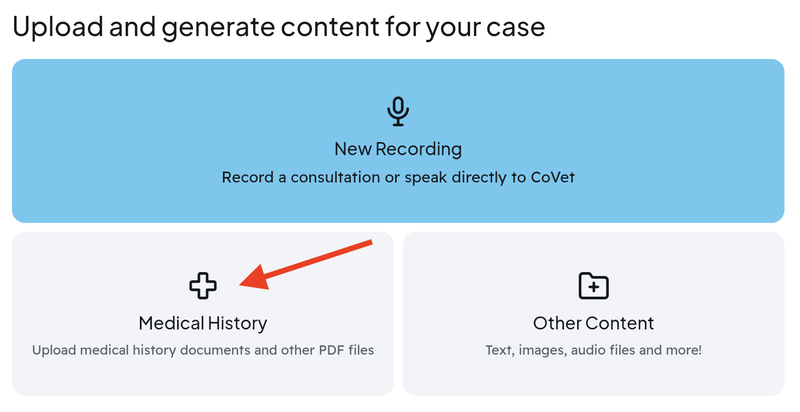
Pick a template. Start with "Medical History - Detailed", the template the help center suggests. If you've built your own, set it as the default (May 2026). If no template fits, choose Description and say what the summary should cover (Summary and Email tabs only).
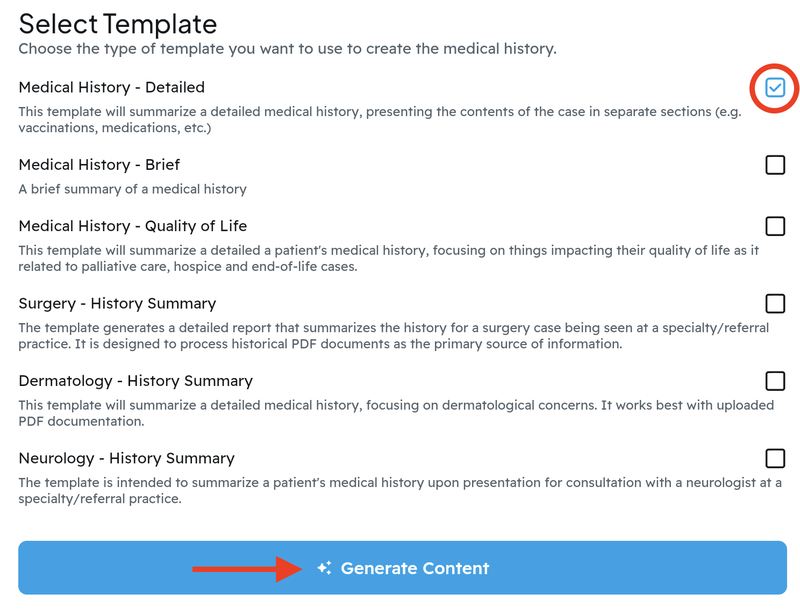
Generate. Click Generate Content. Name the case yourself, or CoVet names it after processing.
Check the citations. Open the summary from the case content feed. Click any citation and the PDF opens at that passage, highlighted. The sources banner opens a list of every input used: a panel on the right on desktop, a bottom sheet on mobile.
Ask a follow-up. Ask AI Chat in plain language, such as "When did the vomiting first start according to the record?" or "What abnormal lab values are noted in the PDF?" Click "View Sources" under the answer to see the document, page and passage it used. AI Chat finds information. Your clinical judgment stays yours.
Keep the original. Download any uploaded PDF from its three-dot menu with Download PDF. It keeps its original file name (September 2026).
The summary stays in the case with the rest of the patient's work, and CoVet integrates with your existing practice management system.
How do you get a referral packet into the case from your inbox?
When the referral packet arrives as an email attachment, forward it straight into CoVet.
As of October 2026, per CoVet's help center (Using CoVet's Email Assistant):
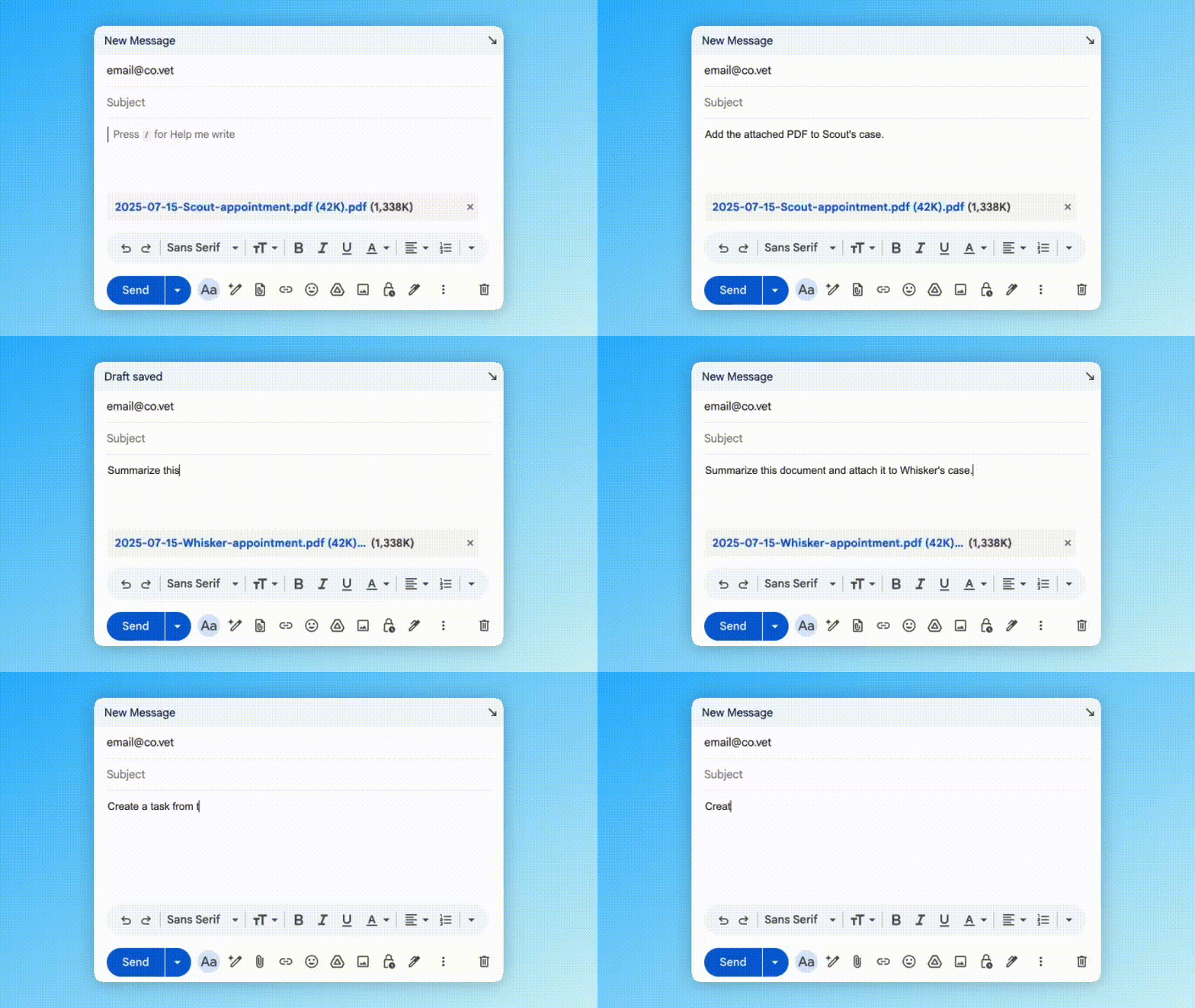
Turn on "Enable CoVet Email Assistant" in App Settings.
Forward the email, with its PDFs, images or audio, from the address linked to your CoVet account. The forwarding address is in the help article.
Add a short instruction in plain language, such as "Summarize this document and add the summary to Mia's case."
CoVet creates a case or adds the content to an existing one. One email covers one case, so send one per patient. If several patients share a name, CoVet replies to ask which one. Activity shows on the Email Assistant page and in the case activity log.
How do you check a summary against the original PDF?
Start with the facts your plan depends on: the timeline of signs, the last dose of each drug, the most recent results. Click those citations first, so you read the referring vet's own words before you build on them.
Inline citations come from PDF inputs. Anything from a recording, such as the consult itself, you check against the transcript. Our guide to checking an AI-drafted record, step by step covers both.
Some problems live in the PDF itself: a missing page, a faint scan, a handwritten note. When a page is hard to read, open the original and read it yourself. The summary works from the files you upload, so a gap in the packet stays a gap in the summary.
Can you summarize lab reports alongside the history?
Yes. Upload the lab report PDF to the same case as the history. As of October 2026, per CoVet's help center, AI Chat reviews uploaded medical histories and lab reports (PDFs) automatically. Ask "What abnormal lab values are noted in the PDF?" and View Sources shows the document, page and passage behind the answer.
To summarize lab reports in writing, use the same flow as any other PDF. If the standard templates don't fit, use a custom template or describe the summary you want.
Example: a referral packet two minutes before the room
Example scenario, not a customer case.
Biscuit is a 9-year-old Labrador referred to internal medicine for intermittent vomiting. His packet holds records from his GP, an overnight ER visit and a past specialist: around 50 pages in three PDFs, plus the ER's bloodwork.
The internist uploads all four files and generates "Medical History - Detailed". The draft lays out the GP's question, the timeline and the drugs he's had. One line notes a maropitant dose at the ER. She clicks the citation and the ER treatment sheet opens at the highlighted line.
She asks AI Chat, "When did the vomiting first start according to the record?" The answer points to a GP visit note, page and passage shown. A second question, about abnormal values in the bloodwork PDF, comes back sourced too.
She walks in knowing what's been done, what the GP wants answered and where each fact lives. Her attention goes to Biscuit and his owner.
Can you find the case again later?
Yes. With Smart Search (May 2026, per CoVet's Product Updates log), you find a past case by describing it. In All Cases, switch to Smart mode and type the case the way you'd tell a colleague. CoVet matches by meaning and returns the top 10 results, on iOS, Android and web.
Frequently asked questions
Does CoVet cite sources in its summaries?
Yes, for facts drawn from PDFs. Each links to its page and passage in the original, and the sources panel lists every input used. Records generated without PDF inputs have no inline citations.
Can I upload records from several clinics at once?
Yes. Select several PDFs with Command or Ctrl when you upload, and CoVet summarizes them for the same case. You can also batch-upload PDFs, audio and images together.
Can CoVet answer questions about a lab report PDF?
Yes. AI Chat reviews uploaded lab reports along with the history and your case notes. View Sources shows the page and passage behind each answer, so you can check the value.
Does the summary replace reading the record?
No. It's a draft for your review. Use it to find your way into a long packet, then open the citations behind the facts your decisions rest on.
Can I use my own summary template?
Yes. Upload your PDFs from the new case screen, click Generate from Library and pick your template on the Summary tab. Star it or set it as your default, or describe the summary you want instead.
Where does my clients' data go?
CoVet sets out how it handles client and patient data on its Security and Trust pages. Read both before you upload records from another practice.
What changes when you know the patient before you walk in?
When you summarize veterinary medical records before the consult, you spend the consult on the patient and the owner. The history is in your head, its sources a click away. You still read the parts that matter, in the referring vet's own words. Here's what a veterinary AI copilot does across the rest of your day.
About the Author

The CoVet Team
The CoVet team brings together veterinary professionals, technologists, and industry experts working to make clinical documentation easier and more sustainable.
)
)
)