)
)
CoVet is an AI clinical copilot built for veterinary teams. When you record a consultation, CoVet turns the conversation into a structured clinical record, organising the relevant history, examination findings, assessment, and treatment plan into your preferred format. You can check the original transcript, review the AI-generated notes, make changes, and approve the final record yourself.
That same clinical information can help you prepare discharge instructions, client summaries, referral letters, and follow-up communications, without starting from scratch. CoVet also supports clinical reference questions, lab and history summaries, shift handovers, and integrations with your existing practice management system.
More than 35 veterinary professionals help develop and improve CoVet, bringing firsthand clinical experience to its documentation templates, features, and workflows. Their input helps ensure the product reflects how veterinary teams actually work, while you remain responsible for every clinical decision and the records you approve.
Key takeaways
|
What does "veterinary AI copilot" mean?
A veterinary AI copilot turns a recorded consult into a draft clinical record, then helps with the work around it. The vet approves every record.
The AI scribe is the part you notice first. It listens in the room and writes the draft while you examine the patient. The rest of the copilot works from that same case once the draft exists: the letter to the specialist, the summary the owner takes home, the handover for the overnight vet, the quick check on your differentials. Every part hands you a draft or a reference. You make the call.
Here's how the parts fit together, and where you come in at each one.
Part | What it does | What you do |
|---|---|---|
AI scribe | Drafts the clinical record from the recorded consult | Check the transcript, edit, approve |
Client documents | Drafts discharge instructions, client summaries, referral letters and follow-up emails | Edit before anything is sent |
History and lab report summaries | Summarises uploaded PDFs, with each fact cited to its page | Open the source when a detail matters |
Clinical reference | Lists differentials and a diagnostic plan, with linked sources | Decide what fits your patient |
Handovers | Builds one report across your open cases | Edit it, then hand over |
Integrations | Sends the approved record to the patient file in your existing practice management system | Approve the record first |
What does a veterinary AI scribe do?
A veterinary AI scribe listens to the consult, or to your dictation, or to a recording you upload afterwards, and drafts a structured clinical record for you to review and approve. The draft follows your template: a SOAP note with history, examination findings, assessment and plan, or a recheck, or a surgical report.
CoVet's AI scribe works from templates built for every species. In a multi-pet consult, it writes a separate record for each patient from the one recording. Behind every draft sits the full transcript, searchable and timestamped, so you can go back to what was actually said.
If you're comparing tools, our veterinary AI scribe page covers CoVet's scribe in detail, and the buying guide explains how AI scribes work, and what to look for in one. Prefer to talk through your findings after the consult? That's veterinary dictation software, and CoVet handles it too.
What can a veterinary AI copilot do? CoVet's seven capabilities
CoVet groups its features into seven jobs a vet recognises, from the exam room to the end of the shift. Each one starts from the same recorded case, and each one hands you a draft to review. The table gives the short version. The sections below give the detail, with a link to a deeper post or page for each.
Capability | What you get back | Read more |
|---|---|---|
1. Documentation in the room | A draft record while you stay with the patient | |
2. Records in your clinic's voice | Records in your format, with your abbreviations and your level of detail | |
3. Know the patient before you walk in | Cited summaries of histories, referral packets and lab reports | |
4. A second set of eyes | Differentials and a diagnostic plan, with sources | |
5. Clients who understand | Summaries, handouts, referral letters and follow-ups to edit and send | |
6. Nothing dropped between shifts | One handover report across your open cases | |
7. Fits the clinic you already run | Appointments in, approved records back to the patient file |
1. Documentation in the room (the AI scribe)
Keep your eyes on the patient. CoVet listens and drafts the record while you work.
Press record at the start of the consult and talk the way you already do: to the owner, to the tech, to yourself over the exam table. CoVet's AI scribe turns the conversation into a draft record in your template. When a second dog comes in with the first, a multi-pet consult gives each patient its own record from the one recording. Dictate after the visit instead, or upload audio later, and the draft comes out the same way.
Out on a farm call with one bar of signal? CoVet records offline, saves the audio in chunks as it goes, and uploads it when you reconnect.
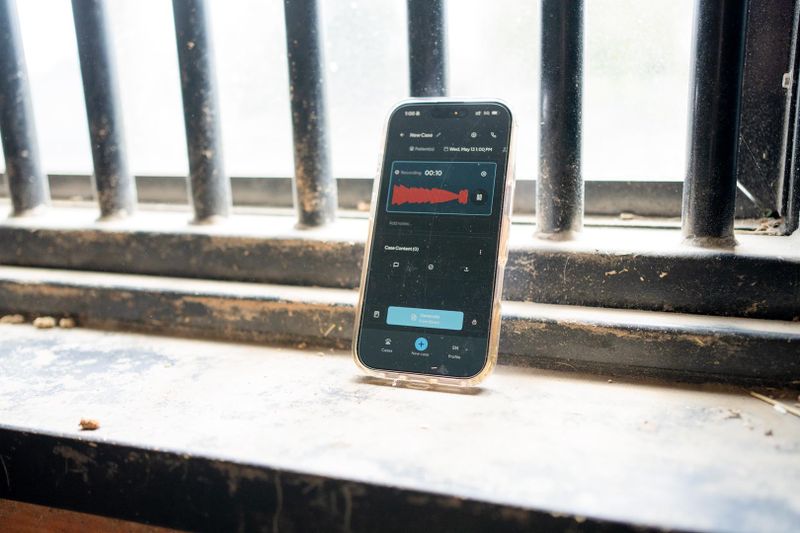
Ambient recording or dictation
Multi-pet records, one per patient, from a single recording
Client phone calls recorded and summarised in the case, up to one hour per call and four hours a day
Focus Mode, a stripped-back view for recording and reviewing, designed mainly for your phone
A full transcript with timestamps, playback and search behind every draft
Before you approve a draft, you can check AI scribe notes against the transcript.
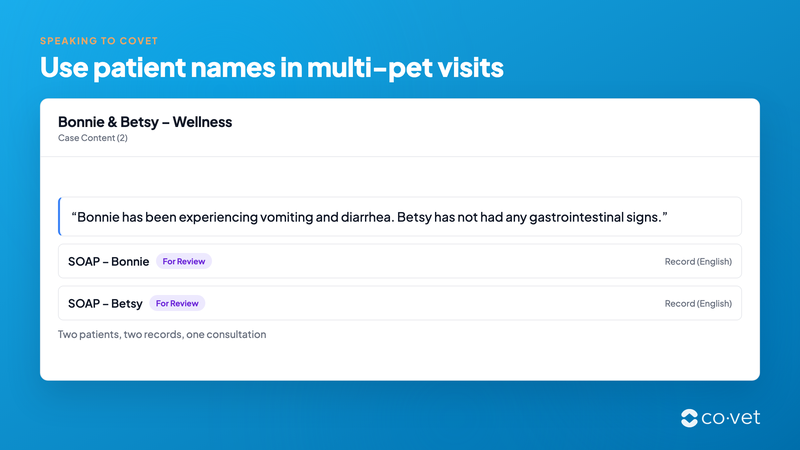
As of October 2026, per CoVet's help center: multiple patients in one consultation, recording a consult, phone calling, recording offline, Focus Mode, transcripts.
2. Records in your clinic's voice (templates and personalisation)
Records that read like you wrote them, in the format your clinic already uses.
Every clinic writes a record its own way, and the draft should match yours. Start from a CoVet template or build your own. Coco, the template assistant, takes a description by text, audio or a file, drafts a template, and lets you test and refine it until it reads right. Detail Level sets how much CoVet writes, Concise, Standard or Detailed, as your default, for one template, or for a single case. Your abbreviations go in automatically, and you choose which ones are allowed in anything a client will read.
Customizable SOAP notes, plus custom and advanced templates
Snippets with dynamic variables that fill in the patient's name, species or dose
Procedure and surgical report templates
Dental charts by voice, canine and feline
PDF presets with your logo, header and clinic details, up to 10 per user
More than 35 veterinary professionals help develop and improve CoVet, and its documentation templates are where their clinical experience goes first.
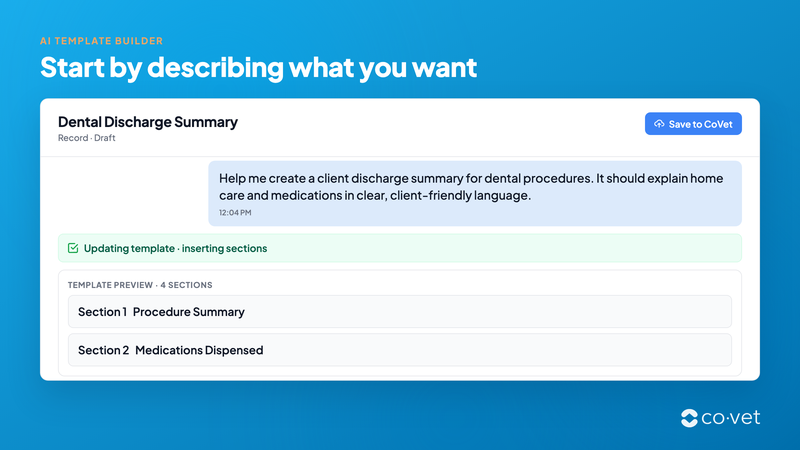
As of October 2026, per CoVet's help center: Coco, Detail Level, abbreviations, snippets, procedure reports, dental charts, PDF presets.
3. Know the patient before you walk in (history and lab report summaries)
Walk in knowing the history, and see the page each line came from.
The referral packet lands two minutes before the room. Drop the PDFs into the case, or forward the email to CoVet's Email Assistant with a one-line instruction, say, to summarise it and add it to Mia's case. The Medical History button turns one file or a whole stack into a summary, and each fact in it cites the page and passage it came from. One click takes you to the source. Lab reports work the same way: upload the PDF and use the Lab Results summary template.
Batch upload of PDFs, audio and images together
AI Citations: inline citations appear when the record cites PDF inputs, and the sources panel lists every input CoVet used
AI Chat for questions about the case's documents, with its sources shown
Smart Search: describe a case, such as "senior labrador limping right hindlimb", and get the top 10 matches (cases created after 26 March 2026)
The full walkthrough is in our post on how to summarise medical records and lab reports before the consult. To trace a summary line back to its page, see how to check AI scribe notes.
As of October 2026, per CoVet's help center: summarising a medical history or other PDF, available templates, Email Assistant, AI Citations, Smart Search.
4. A second set of eyes (clinical reference)
Check your differentials against trusted references before the patient leaves.
Some cases deserve a second look before you commit to a plan, and the colleague you'd ask is in surgery. Consult CoVet, powered by LifeLearn, opens inside the case and lays out the most likely differentials, the must-not-miss differentials, additional considerations, a diagnostic plan and new developments. Each section links to the source material it draws on. It's included on all plans.
AI Chat answers questions about the case itself, from its PDFs, transcripts and notes, and draws on LifeLearn and web sources for clinical questions. Every answer lists where it came from: the page and passage for a PDF, the transcript line for a recording. CoVet's help center puts it plainly: AI Chat is "Not a replacement for your clinical judgment."
You read the references, and you decide. Read more about Consult CoVet and its launch with LifeLearn.
As of October 2026, per CoVet's help center: Consult CoVet, AI Chat.
5. Clients who understand (client communication)
Owners leave with a plan they can follow at home.
The owner nodded through the whole plan. At home, at 9 p.m., the details are gone. CoVet drafts the visit or discharge summary from the case, and you add photos, PDFs and handouts before it goes. A multi-pet household gets one document covering every pet. You can send the summary in French or Spanish, even when the consult was in English.
The same case information drafts the rest of the paperwork:
Referral letters, with the "Email to Specialist - Case Referral" and "Email to rDVM - Case Report" templates
Follow-ups, with the "Email to Client - Visit Recap" and "Email to Client - Lab Results" templates, which you edit before sending as email text or a PDF attachment
Vetlexicon client handouts, suggested from your notes and searchable by species and category
An owner-friendly dental chart, generated alongside the clinical one (see dental charts by voice)
Communication Feedback, private feedback on eight competencies drawn from your own recordings, with no overall score, on the Unlimited plan. Read about feedback on your client conversations.
See visit and discharge summaries for examples.
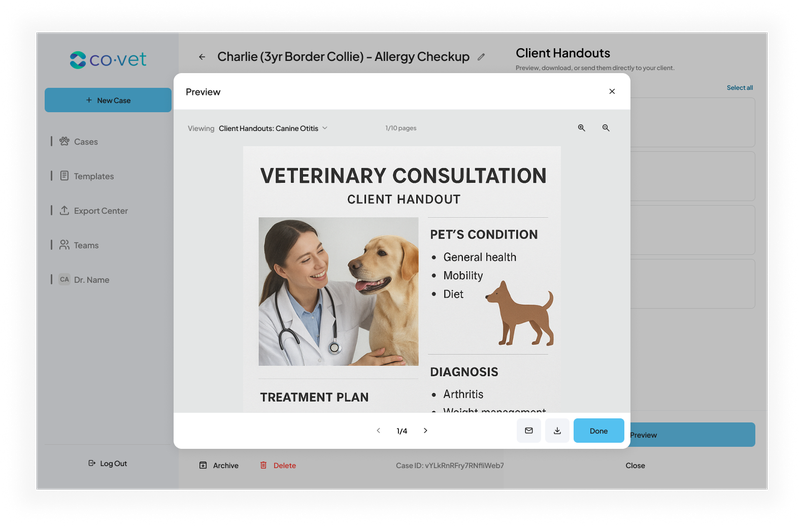
As of October 2026, per CoVet's help center: visit and discharge summaries, available templates, Vetlexicon handouts, Product Updates, Communication Feedback.
6. Nothing dropped between shifts (handovers and teamwork)
Hand over the whole caseload in one report the next vet can read at a glance.
Shift change, a full ward, and the overnight vet needs the picture in five minutes. Select your open cases and Rounds builds one handoff report, with an I-PASS card for each patient: illness severity (Stable, Watcher or Unstable), code status, the problem list and recent course, action items and contingency plans. Unstable patients sort to the top. Edit the cards, then download the report as a PDF. Rounds is on the Essentials, Unlimited and Enterprise plans, and Support accounts have it too.
Multi-day cases keep a whole hospital stay in one record
Unassigned cases for triage, which anyone on the team can claim
Suggested To Do and Billing tasks from what was said in the recording
Account switching with a personal 4-digit PIN on shared workstations
Free support accounts for techs and assistants, who start cases and recordings for the vet
The full story is in our post on veterinary shift handoff reports. Still rounding on paper? Our patient rounds template is a good place to start.
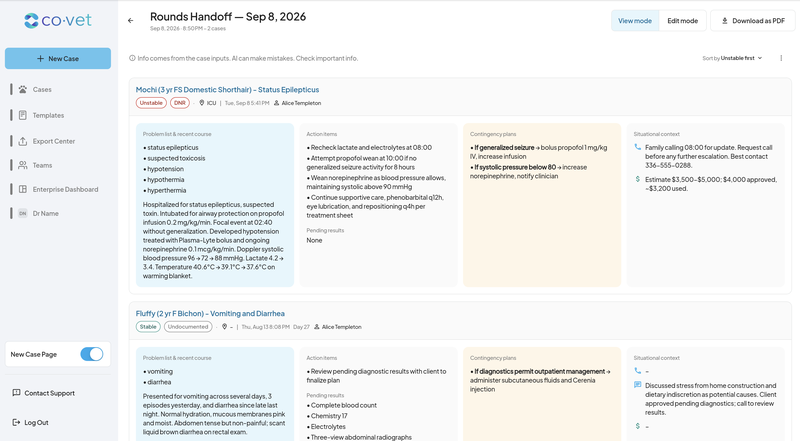
As of October 2026, per CoVet's help center: Rounds, multi-day cases, unassigned cases, tasks, account switching, support accounts.
7. Fits the clinic you already run (integrations, security, enterprise)
Your appointments come in, and the record you approve goes back to the patient file.
CoVet integrates with your existing practice management system. Here's what moves where:
In: with a direct integration, the day's appointments arrive in CoVet as linked cases.
Back: the record you approve goes to the matching patient file.
Web-based systems without a direct integration: the Chrome extension places CoVet content into the fields you mapped, or you copy sections from the side panel.
Tracking: the Export Center shows each record's status, and you mark a record "Not for Export" when it shouldn't go.
CoVet has 15 PMS integrations, including AVImark, Cornerstone, ezyVet, Provet and Vetspire. The exact steps differ by system, so check the guide for yours to see what moves between the two. Our post on how CoVet works with your practice management system walks through it.
For groups, the Enterprise Dashboard reports usage across more than one hospital. See CoVet for veterinary groups. On security and data ownership, CoVet is SOC 2 Type II and ISO 27001 certified and doesn't train models on user data, per CoVet's security page. Our trust page explains how review and traceability work.
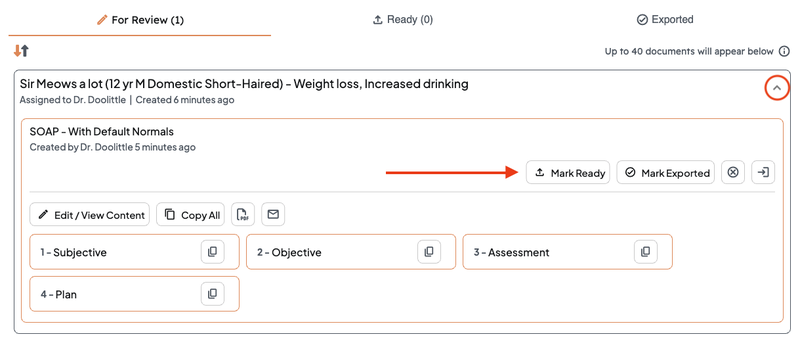
As of October 2026, per CoVet's help center: PMS integrations and connections, Chrome extension, Export Center, Enterprise Dashboard.
How it works in CoVet
Here's one consult, start to finish, with CoVet as your veterinary AI copilot.
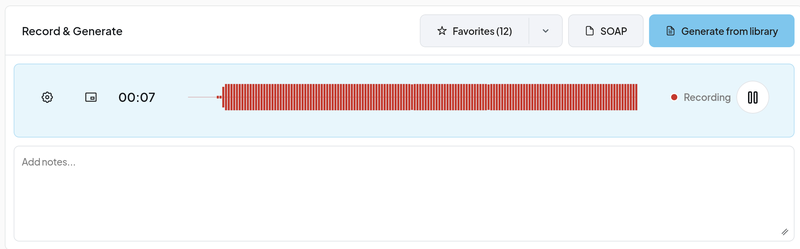
Open the case. With a PMS integration, today's appointments are already waiting as cases. Otherwise, tap New Case.
Record the consult. Or dictate, or upload audio and documents you already have.
Generate the record with your template. The AI scribe drafts it in your format and at your level of detail.
Check the draft. Read it against the transcript and, for anything from a PDF, the citations. Edit what needs editing.
Make the client outputs. A visit summary, handouts, a referral letter, a follow-up email you edit before it goes.
Approve the record and send it to your existing practice management system through the integration, the Chrome extension or the Export Center.
What does a day with a veterinary AI copilot look like?
An example, not a customer story.
It's Tuesday for a GP at a two-vet clinic. At 7:50, a referral packet for her 8:00 appointment arrives by email. She forwards it to CoVet with one line, and before she walks in, the history summary is in the case, each finding cited to its page. She clicks the one about a previous reaction to sedation and reads the original note.
At 11:20, two cats from the same house come in together. She records once. CoVet drafts two records, one for each cat, and a single visit summary for the owner. She edits a dose instruction and sends it with a handout attached.
At 3:40, the senior Lab with the cough needs a cardiology workup. The referral letter comes out of the same case. She tightens the history paragraph and sends it.
At 6:00, she selects her six open inpatients and Rounds builds the handover for the overnight vet, the unstable one at the top. She adds a note to the contingency plan for the diabetic cat.
Each record goes to the patient file after she approves it. She's home for dinner.
What stays with you?
You approve every record, and you make every clinical decision.
Everything CoVet writes is a draft for your review. You check the transcript and the cited sources, make your changes, and approve the record before it goes anywhere. As the vet, you stay responsible for the final medical record, and CoVet is built around that.
Consult CoVet and AI Chat show their sources, so you can judge each suggestion against the reference it came from.
More than 35 veterinary professionals help develop and improve CoVet, and you remain responsible for every clinical decision and the records you approve. Our trust page explains how CoVet keeps you in charge of the record.
How do you check what the copilot drafted?
Go back to the source. For anything said in the room, open the transcript from the case. Each line shows when it was said, and clicking a sentence plays that moment, so you hear the dose exactly as you said it. A line that couldn't be timed shows "Time unavailable", which tells you to listen. For anything from a PDF, the inline citation opens the document at the cited page and passage.
Correct the draft in Edit Mode. The original transcript never changes, so the source stays as it was.
Every check ends with you. CoVet doesn't sign anything, and no accuracy percentage replaces your read of the draft. The step-by-step guide is our post on how to check AI scribe notes. For how to judge any scribe's output, see veterinary AI scribe accuracy, and for CoVet's approach, the trust page.
As of October 2026, per CoVet's help center: transcripts, AI Citations.
Who uses a veterinary AI copilot?
General practice vets with a full book and a two-pet consult every afternoon
Emergency and urgent care teams handing over at shift change (urgent care)
Specialty and referral vets reading thick referral packets before the room (specialty and referral)
Mobile, equine and farm vets recording in a barn at 6 a.m., with CoVet recording offline when the signal drops (equine)
Techs and assistants starting cases and recordings for the vet on free support accounts
Group and hospital leaders setting templates and reviewing usage across sites (enterprise)
Frequently asked questions
How does CoVet work with my practice management system?
CoVet integrates with your existing practice management system. With a direct integration, appointments arrive in CoVet as linked cases, and the record you approve goes back to the patient file. Web-based systems use the Chrome extension. CoVet has 15 PMS integrations. Read how CoVet works with your practice management system.
What does a veterinary AI scribe do?
A veterinary AI scribe listens to the consult, a dictation or an uploaded recording and drafts a structured clinical record, such as a SOAP note, for the vet to review and approve. CoVet's AI scribe writes in your template and keeps a timestamped transcript behind every draft. The buying guide covers more.
What AI tools help veterinarians with documentation?
AI scribes and dictation software draft the clinical record from the consult. An AI clinical copilot like CoVet adds the work around it: history and lab report summaries, client documents, referral letters and shift handovers, each a draft you review. For a wider list of tools, see our roundup of AI vet tools.
Who makes the clinical decisions?
You do. Consult CoVet lays out differentials and a diagnostic plan with linked LifeLearn sources, and AI Chat lists the sources for every answer, so you can weigh each suggestion. You approve every record, and you remain responsible for every clinical decision.
Does CoVet work without an internet connection?
CoVet records offline. It detects a dropped connection, saves your recordings and notes to the case, and uploads them when you're back online. Audio is saved in chunks as you record, so a lost signal or a flat battery doesn't cost you the consult.
Which plan includes which capability?
Consult CoVet is included on all plans. Rounds is on Essentials, Unlimited and Enterprise, and Support accounts have it too. Communication Feedback is on the Unlimited plan only. Support accounts are free. For the full comparison, see plans and pricing.
Try it on one real case
The best test of a veterinary AI copilot is your own consult. Pick a real one tomorrow. Record it, and then ask three questions. What did CoVet draft? Who reviews each document before it goes? How does the approved record reach the patient file?
CoVet is an AI clinical copilot built for veterinary teams: it turns your recorded consult into a structured clinical record, and you check the transcript, make your changes and approve it yourself.
About the Author

The CoVet Team
The CoVet team brings together veterinary professionals, technologists, and industry experts working to make clinical documentation easier and more sustainable.
)
)
)