)
)
To improve your veterinary communication skills, review real consults, one skill at a time. CoVet, an AI clinical copilot built for veterinary teams, includes Communication Feedback. It reads the recordings you added to a case and gives private feedback on eight communication competencies, with quoted transcript moments and a learning module for each. It's on the Unlimited plan.
CoVet is an AI clinical copilot built for veterinary teams. When you record a consultation, CoVet turns the conversation into a structured clinical record, organising the relevant history, examination findings, assessment, and treatment plan into your preferred format. You can check the original transcript, review the AI-generated notes, make changes, and approve the final record yourself.
Communication Feedback uses those same recordings to look at how you talked with the client.
Key takeaways
|
You know the drive home. You're still in consult room two, replaying the moment you said the estimate out loud and the owner went quiet. Did they hear the plan at all? Most of us never find out. Getting better at client conversations means hearing your own, honestly, without an audience.
Which veterinary communication skills matter most in a consult?
Communication Feedback looks at eight communication competencies. As of October 2026, per CoVet's help center, here's what each one covers, next to what veterinary studies have found.
Competency | What it looks at | What veterinary research says |
|---|---|---|
Active Listening & Empathic Inquiry | Inviting input, reflecting understanding, exploring emotions | Vets asked for the client's concerns in 37% of 334 appointments. Clients who got to answer were interrupted in 55% of those, after a median of 11 seconds (Dysart, Coe and Adams, JAVMA, 2011). |
Consultation Structure & Flow | Agenda setting, logical progression, time management | In the same study, when the vet didn't ask for concerns at the start, the odds of a new concern coming up at the close were four times as great (Dysart et al., 2011). |
Rapport & Relationship Building | Trust, warmth, partnership, non-verbal cues | Pet owners in focus groups expected partnership and two-way communication (Coe, Adams and Bonnett, JAVMA, 2008). |
Transparent Clinical Reasoning | Thinking aloud, explaining the why, showing your work | Explaining the rationale for a recommendation is part of the relationship-centred approach the Kanji study linked to adherence (Kanji et al., JAVMA, 2012). |
Recommendations & Shared Decision-Making | Presenting options, involving the client, clear rationale | Among 83 clients, the odds of following a dental or surgical recommendation were 7 times as great when it was clear rather than ambiguous (Kanji et al., 2012). |
Contextual Care & Ethical Awareness | Financial sensitivity, cultural awareness, ethical considerations | Vets named money among their main challenges with clients (Coe et al., 2008). New Zealand mentors named financial awareness as a weak spot for new graduates (Gates et al., NZ Vet J, 2021). |
Consent, Closure & Follow-Through | Confirming understanding, gaining agreement, planning next steps | Communication problems appeared in 80 of 100 settled negligence claims. Of 170 problems found, 52% were a failure to reach shared understanding (Russell et al., Veterinary Record, 2021). |
Self-Awareness & Reflective Communication | Recognising your own biases, adjusting style, correcting mid-consult | Colorado State students' quiz knowledge of communication skills didn't predict how they performed with real clients in year 4 (Janke, Shaw and Coe, JAVMA, 2022). |
That last row is the case for reviewing real consults. You can know every skill here and still interrupt at second eleven.
Why is it hard to get feedback on your own consults?
In a 2012/13 survey of UK and US vets, 98% rated communication skills as important as clinical knowledge, or more important (University of Nottingham, Centre for Evidence-based Veterinary Medicine). The same research team found what gets in the way of more training: time, cost and doubts that it adds value (McDermott et al., Veterinary Record, 2017).
Vet schools teach the Calgary-Cambridge guide as a consultation structure (Mossop and Gray, In Practice, 2008). A 2026 review of 37 studies found structured feedback and reflective video review among the common ways communication gets taught (López-López et al., Veterinary Sciences, 2026). After graduation, veterinary consultation feedback means a senior vet in the room or a camera in the corner. Both are rare, and both change the consult.
Privacy matters too. In a 2025 Texas Tech study, 65% to 69% of vet students were quite a bit or greatly concerned about data privacy when using AI tools (Artemiou et al., Frontiers in Veterinary Science, 2025). Any feedback worth having has to stay yours.
How do you review a consult on your own?
You can start tonight, with no software at all. Here's how to improve client communication one consult at a time:
Pick one consult you want to learn from. A good one counts. Make sure you recorded it with the client's agreement, and check the recording consent rules where you practise.
Listen to the first two minutes. Did you ask what brought them in? Did you let them finish? Remember the 11-second median.
Listen to the last two minutes. Did the owner say the plan back to you? Did a new worry come up with a hand on the door?
Pick one competency and work on it for your next few consults. One. Working on one gets you further than trying to change everything at once.
If you want a structure for the whole visit, our guide to client communication sets out a step-by-step structure for client conversations.
What does CoVet's Communication Feedback do?
As of October 2026, per CoVet's help center, Communication Feedback reviews the consultation recordings you added to a case and gives you private feedback on how you communicated with the client. Your veterinary communication skills get read from real conversations.
Each run produces one report for the case:
An Overview: Main Strengths (two or three things that came through well) and Focus Next Time (two or three places to put your attention).
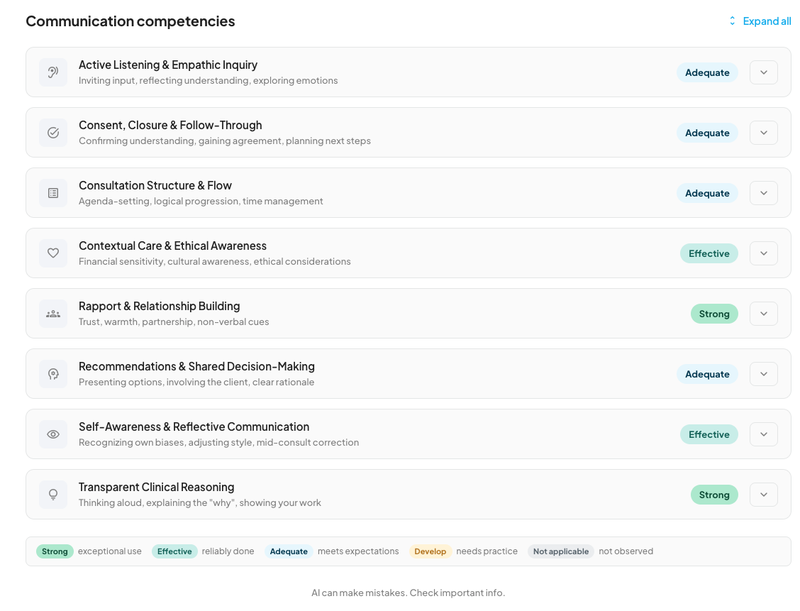
Eight competencies, each with a badge: Strong, Effective, Adequate, Develop or Not applicable. Not applicable means the consult didn't give enough to go on. The help center calls it "not a negative result."
Commentary and quoted transcript moments for each competency, showing who was speaking and when.
A learning module for each competency, with four parts: Definition, Why it Matters, How to Recognize This Skill, and Related Competencies.
There's no overall score and no ranking against other users.
Who sees it: The results are yours alone. They are not shared with your team, your practice owner or anyone else on the account. It analyzes only the recordings you added. In a case where several people recorded, each person gets feedback on their own recordings, and nobody sees anyone else's. See how CoVet handles your recordings and CoVet security.
Plan and devices: Communication Feedback is on the Unlimited plan only. On other plans it doesn't appear in the Tools menu. It works on web, iOS and Android.
How it works in CoVet
Open the case. It needs at least one recording you added. Without one, Communication Feedback stays greyed out with the note "Requires at least one recording."
Open the Tools menu and select Communication Feedback. On mobile, it's in the More sheet.
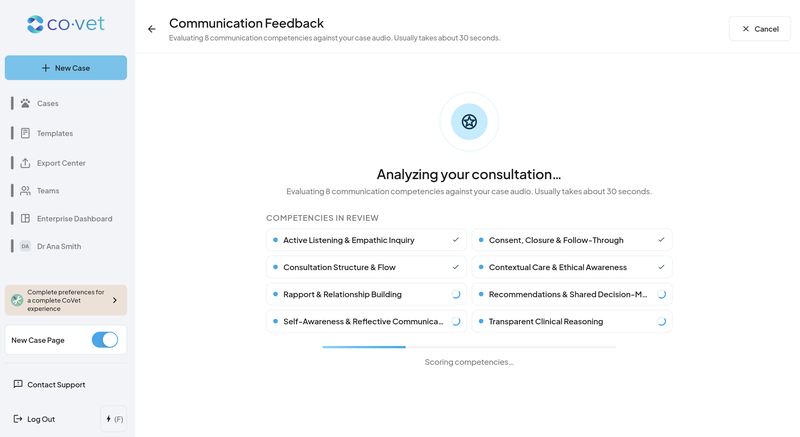
Let it run. The analysis starts on its own and shows progress for each competency and each recording. The help center puts a run at around 30 seconds. If you leave the screen before it finishes, the run stops and nothing is saved.
Read the Overview, then the competencies. The eight rows arrive collapsed. Open one to see the commentary next to the transcript moments, or use Expand all.
Select Learn more on any competency to open its learning module.
Download a PDF if you want a copy. It holds all eight competencies with their badges, commentary and transcript moments, plus the privacy notice and the AI disclaimer.
A new run replaces the previous report for that case, so download first if you want to keep the earlier one. The feature is on by default. To hide it, go to Profile, then Other Integrations and Connections, and switch off the Communication Feedback card. Your existing reports are kept.
Example: one consult, one thing to work on
Example (illustrative). This is an invented consult and an invented report.
Thursday, 5:50 p.m., last consult of the day. An 11-year-old Labrador with a new lump on her flank, and an owner who asks about cost twice before you've finished the exam. You recommend a fine-needle aspirate and explain why it comes before any talk of surgery. The owner nods and leaves.
That evening you run Communication Feedback. Main Strengths picks out your explanation of why to aspirate first. Focus Next Time notes that you closed the consult without checking the owner could repeat the plan, and quotes the owner's last question with its timestamp, so you can jump straight to it. (Here's how transcript timestamps work in CoVet.)
You open the learning module for Consent, Closure & Follow-Through. Next week, one change: before anyone stands up, you ask the owner to tell you the plan in their own words.
The report looks at the conversation. Whether the aspirate was the right call stays your judgement.
How should new graduates and mentors use it?
New graduates: run it on consults you want to learn from, including the ones that went well. Main Strengths tells you what to keep doing. Then take one item from Focus Next Time and carry it through your next few consults.
Mentors: the report belongs to the vet who recorded. It stays private unless they choose to share it, and the help center names a mentor as one person they could choose to share it with. A downloaded PDF gives you both the same quoted moments to talk through over coffee, instead of a vague "how did that one go?"
What are the limits of AI feedback on a consult?
Communication Feedback hears the recording, and only the recording. The hand on a shoulder in the corridor afterwards isn't part of the picture. It doesn't assess clinical decisions. The help center is clear that it isn't a performance review or an assessment your practice can see. AI can make mistakes, so check anything that matters against your own memory of the consult. And each report covers one consultation. Read it as one honest view of one conversation.
Frequently asked questions
Can my practice owner see my Communication Feedback?
No. Results are private to you. They aren't shared with your team, your practice owner or anyone else on the account, and you share a report only if you choose to.
Which CoVet plan includes Communication Feedback?
The Unlimited plan. On other plans, Communication Feedback doesn't appear in the Tools menu. It works on web, iOS and Android.
Does Communication Feedback give me a score?
No. Each of the eight competencies gets a badge, from Strong to Develop, or Not applicable when the consult didn't give enough to go on. There's no overall score and no ranking against other users.
Does it analyse my colleagues' recordings in a shared case?
No. It analyses only the recordings you added. When several people record in one case, each person gets feedback on their own recordings, and nobody sees anyone else's.
What language is the feedback in?
Your interface language. If the consult was recorded in another language, the feedback still comes back in the language your CoVet interface uses.
One conversation at a time
The goal is simple. You walk out of a hard conversation knowing what landed and what didn't, and you know the one thing you'll do differently tomorrow. To see how Communication Feedback fits with the record, the summaries and everything else, read what a veterinary AI copilot does.
About the Author

The CoVet Team
The CoVet team brings together veterinary professionals, technologists, and industry experts working to make clinical documentation easier and more sustainable.
)
)
)