)
)
CoVet is an AI clinical copilot built for veterinary teams. For veterinary dental charting, you record the dental and talk through each tooth. CoVet turns that into a canine or feline dental chart with per-tooth diagnosis and treatment and your captioned photos, plus a plain-language Client Version for the owner. You review and approve both.
Dental charts are one part of what a veterinary AI copilot does.
Key takeaways
|
What does veterinary dental charting software do?
Veterinary dental charting software records what you found and what you did for each tooth, keeps that chart with the patient's record, and gives you a document to file and share. It comes in two forms: a chart you fill in by clicking each tooth, or an AI scribe that drafts the chart from what you say.
CoVet is the second kind. You're gloved up with a probe in one hand and a mirror in the other, so your voice is the free tool in the room. You say what you see as you go. The AI scribe turns the recording into a dental chart, and you review it, edit it and approve it before it goes anywhere.
Looking for a blank chart to print and fill in by hand? Our veterinary dental chart template has one ready.
Can you fill in a dental chart by voice?
Yes. Record the dental in CoVet, and it drafts the chart from that recording.
The help center's advice is short: name the teeth you're talking about, say the finding and the treatment for each, and record clearly. When you dictate dental findings this way, every finding has a tooth to land on. For example:
"307, tooth resorption, extracted."
"108, slab fracture with pulp exposure, extraction recommended."
"Moderate calculus on the maxillary premolars. Scaled and polished."
You don't need to read out every normal pocket. Page 1 of the chart carries a note that by default reads "Periodontal pocket depth < 3 mm for all teeth unless stated otherwise." Call out the pockets that are deeper and the note covers the rest. You can edit that note in the template, or change it for a single case.
If you already dictate your records, the habits carry straight over. There's more on that in dictation vs transcription and on our veterinary dictation software page.
How it works in CoVet
As of October 2026, per CoVet's help center:
Record the dental in a case. Start the recording when the procedure starts and talk through the mouth as you go.
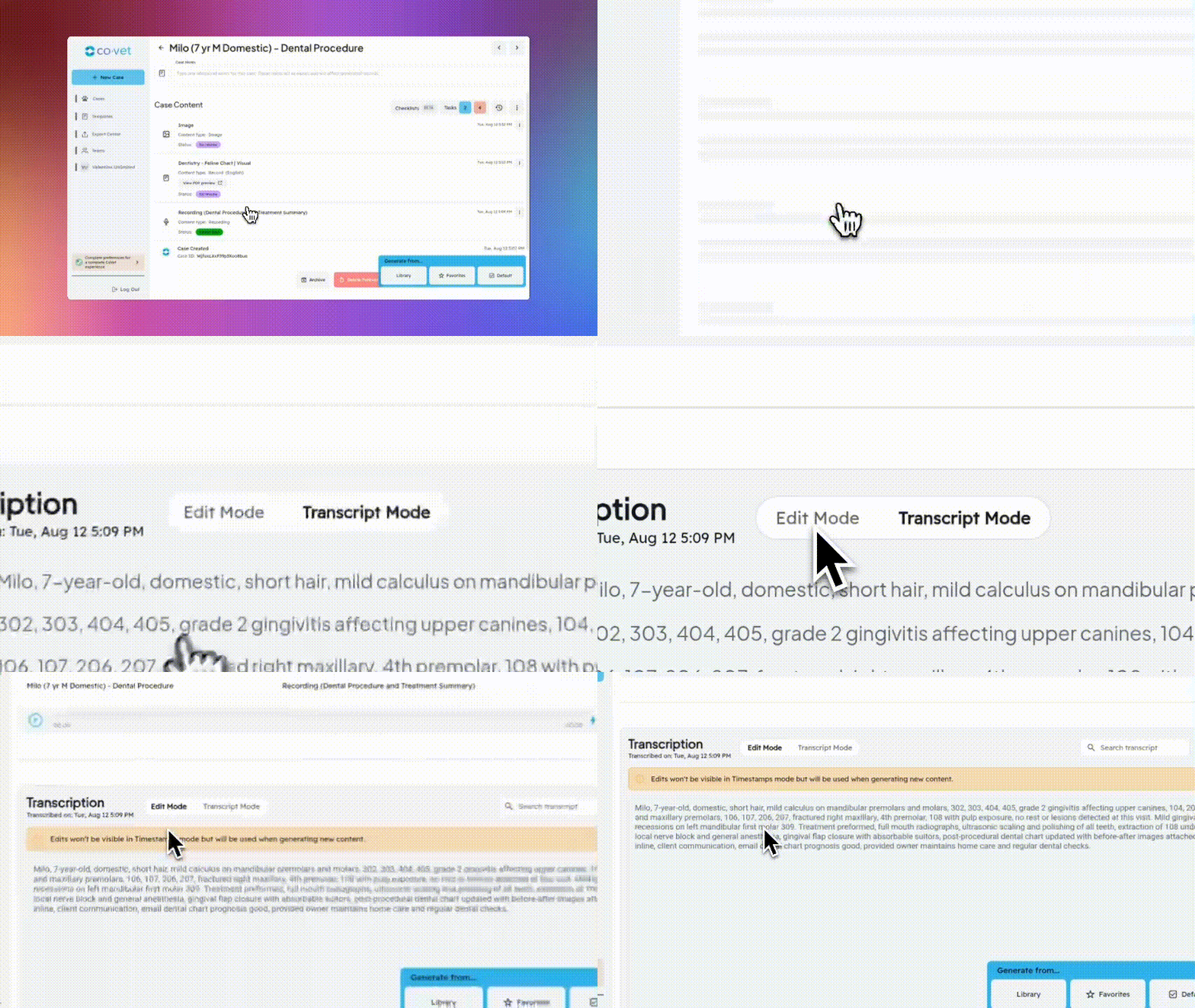
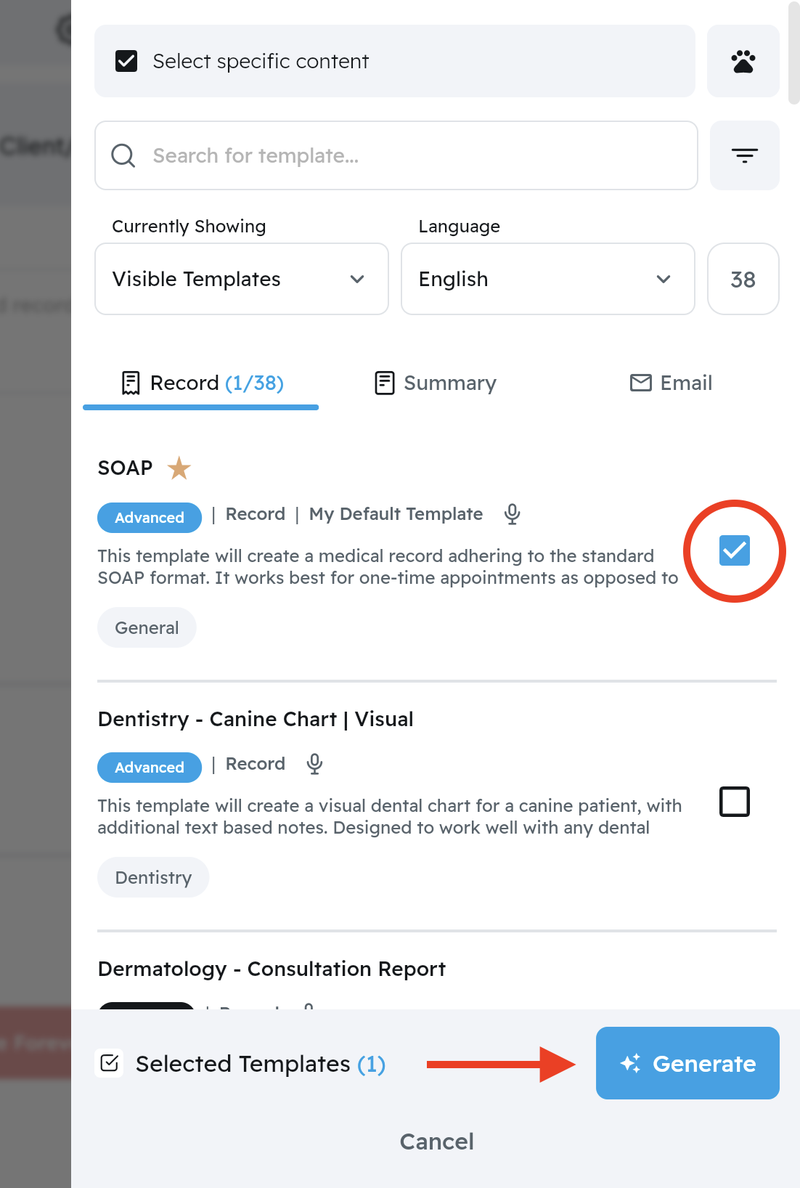
Generate the chart. Select the recording, click Generate and choose the Canine or Feline Dental Chart template.
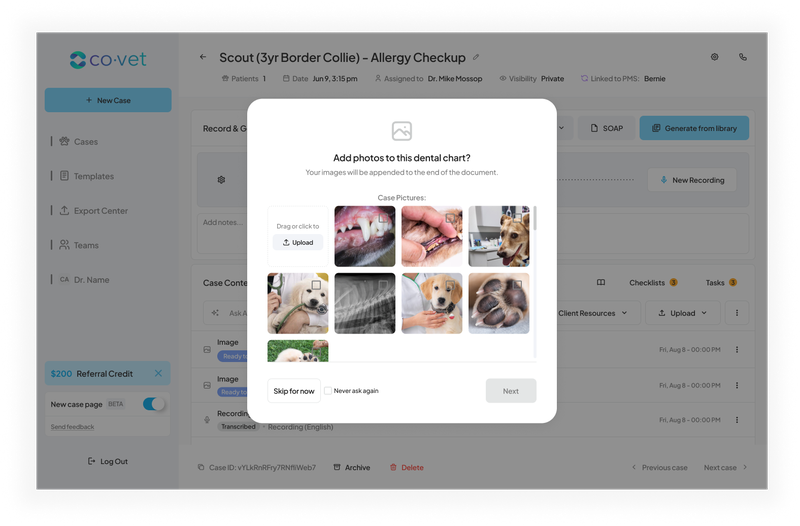
Add photos, or skip. Upload your images, set their size and write captions. The default layout is a grid of four per page.
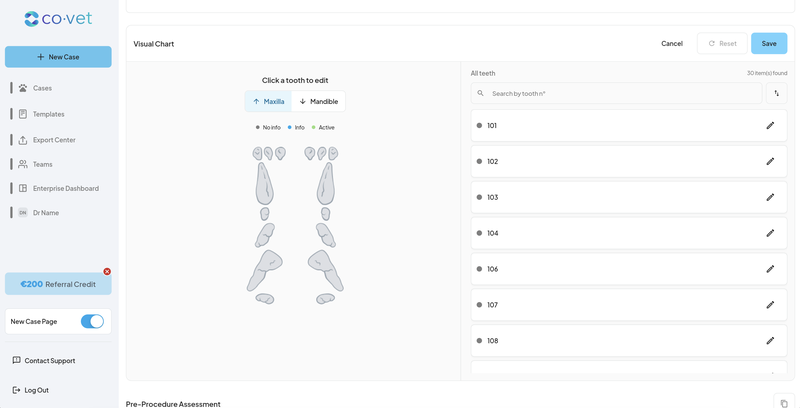
Review each tooth. Every tooth has its own diagnosis (Dx) and treatment (Tx) fields, and your changes save as you type.
Set the Detail Level. Pick Concise, Standard or Detailed. Changing it rewrites the text sections and keeps your tooth findings and the page 1 note as they are.
Choose the view. Switch between Full and Client Version. The PDF follows whichever view you're in when you download, so pick the view first.
Download or share. Download the PDF, or use Share to send it by email to the client or a colleague.
Changed your mind about a photo? Open the report with Edit to add, delete or recaption images, or switch to a large full-width layout, then regenerate the PDF.
What goes in the clinical chart and what goes in the owner's chart?
The Full view is the clinical record. The Client Version is a client-friendly dental chart that keeps only what the owner needs. Here's how they compare, per CoVet's help center:
Full view (for the record) | Client Version (for the owner) | |
|---|---|---|
Who reads it | Your team and referral vets | The owner |
Technical sections | Included, such as Anesthesia and Radiographic Findings | Hidden |
What the owner sees | The whole clinical report | Client Summary, Medications to Go Home, Post-Operative Instructions, Follow-Up Instructions |
How it leaves the case | Download the PDF, or Share by email | Download the PDF, or Share by email |
Both come from the same recording. CoVet started generating the two together on 5 Aug 2026, per the Product Updates log.
Why do owners need their own version of the dental chart?
Pickup is a hard moment to learn anything. The owner is relieved, the cat is groggy, and you're explaining which teeth came out. The research shows how much slips away.
The 2019 AAHA Dental Care Guidelines for Dogs and Cats (Bellows et al., JAAHA, 2019) put client communication and education at their center. They also name fear of anesthesia as the reason owners give most for skipping dental procedures (Today's Veterinary Practice, 27 Mar 2019).
A Swedish national survey asked vets and dog owners about the same advice (BMC Veterinary Research, 18 Mar 2020). 84.6% of veterinarians said they always or regularly recommend tooth brushing. Only 43.1% of dog owners said a clinic had ever recommended it, and fewer than 4% brushed daily.
After periodontal treatment, 42% of responding owners (15 of 36) brushed daily, and they asked for more help with technique and with dogs that won't sit still for it (Acta Veterinaria Scandinavica, 19 Dec 2023). A three-year study found that regular follow-up conversations improved owners' adherence to dental home care, with a small effect (Frontiers in Veterinary Science, 26 Feb 2024).
The older benchmark comes from AAHA's 2003 compliance study: 35% of dogs and cats with grade 2 or higher dental disease had received a dental prophylaxis (dvm360, 1 May 2003).
The home care studies above are all in dogs. We found no equivalent data for cats.
Here's our view. What you said and what the owner remembers sit far apart, and a written copy in plain words closes part of that gap. No study has tested an owner's dental chart yet.
How do I explain a dental chart to a pet owner?
To explain a dental chart to a pet owner, start with what matters to the pet, show them what they can't see, and send the plan home in writing. Five steps that work at pickup:
Start with what you found, in plain words. "One tooth was painful and had to come out" lands better than a list of tooth numbers.
Show a photo for each finding they can't see. Findings below the gumline don't show from the outside. A captioned photo makes them real.
Go through the medications and the aftercare. Which medicine, how much and when, plus what to feed and what to watch for tonight.
Give the follow-up date and what you'll check. A recheck reads as part of the plan when the owner knows what it's for.
Send it home in writing. Email the owner's version so they reread it once the carrier's back on the kitchen floor.
In CoVet, the Client Version holds steps 3 to 5 in writing: the Medications to Go Home, Post-Operative Instructions and Follow-Up Instructions sections. Send it with Share before the owner leaves the building. For more on conversations like this, see our guide to veterinary client communication.
Example: a feline dental on a Tuesday afternoon
This is an illustrative example, not a customer story.
Miso is a 10-year-old cat in for a COHAT. The vet starts the recording as the nurse begins probing, and talks through the mouth tooth by tooth: tooth resorption on two mandibular teeth, both extracted, everything else within normal limits. The intraoral photos go into the chart with captions, in the large full-width layout so the lesions show clearly.
Between procedures, the vet reads the draft, fixes one tooth number and approves it. The Full chart goes on the record.
At five, Miso's owner arrives. The vet sits down with them, shows the two photos and walks through the plan: which teeth came out, the pain medication schedule, soft food for a few days, a recheck in 10 days. Then the vet emails the Client Version so it's waiting in their inbox before they reach the car.
The chart's done and the owner has the plan in writing. The vet heads home on time.
What to check before the chart goes home
The chart is a draft for your review. A few things to look at every time:
Read every tooth entry. Check the tooth, the finding and the treatment against what you did.
Use the right Regenerate. Regenerate on a single section card rewrites that section only. Regenerate in the toolbar rebuilds the whole chart, including tooth findings you've edited. If you've corrected teeth, regenerate section by section.
Copy takes text only. It copies the written sections, without the visual chart.
Pick the view before you download or share. Full gives the clinical PDF and Client Version gives the owner's.
Look over the PDF after any edit. Photos, captions and layout all change the page.
For more on how review works across CoVet, see how CoVet keeps the record in the vet's hands, or our guide to checking an AI-drafted record.
FAQs
Does CoVet chart dogs and cats?
Yes. CoVet has a Canine Dental Chart template and a Feline Dental Chart template, and you choose one when you generate the chart.
How does the dental chart leave CoVet?
As a PDF. You download it, or share it by email from the case. Download uses your last PDF preset, set under Profile › Personalization › Customize PDF.
CoVet integrates with your existing practice management system for the clinical record. Here's how veterinary AI works with your practice management software.
Can I email the dental chart to the owner?
Yes. Open the chart, switch to the view you want to send, and use Share to email it from the case. Email sharing for dental charts arrived in August 2025, and the Client Version in August 2026.
Can I add photos to the chart?
Yes. You upload images with captions when you generate the chart, choose their size and layout, and edit them later before regenerating the PDF.
Can I change what the chart includes?
Yes. Under Templates, open a dental chart template to reorder sections, show or hide them, edit them and set the default Detail Level. You can edit the page 1 pocket-depth note there too, or turn it off.
Where can I get a blank dental chart?
Our veterinary dental chart template covers dogs and cats, and our canine dental chart guide goes tooth by tooth through charting a dog.
Your voice in the room, a chart they can read at home
You already say everything the chart needs while you work. Let CoVet catch it, check the draft over a cup of tea between procedures, and send the owner home with a plan in words they understand.
Dental charts are one piece of what a veterinary AI copilot does for your team.
About the Author

The CoVet Team
The CoVet team brings together veterinary professionals, technologists, and industry experts working to make clinical documentation easier and more sustainable.
)
)
)